
Copy your free time from Google Calendar
Drag across the open slots in your week. Slotclip turns them into a tidy list, grouped by day with the timezone on every time, ready to paste into an email or chat.
Coming soon to the Chrome Web Store
Free. No account needed.
A list people can read at a glance
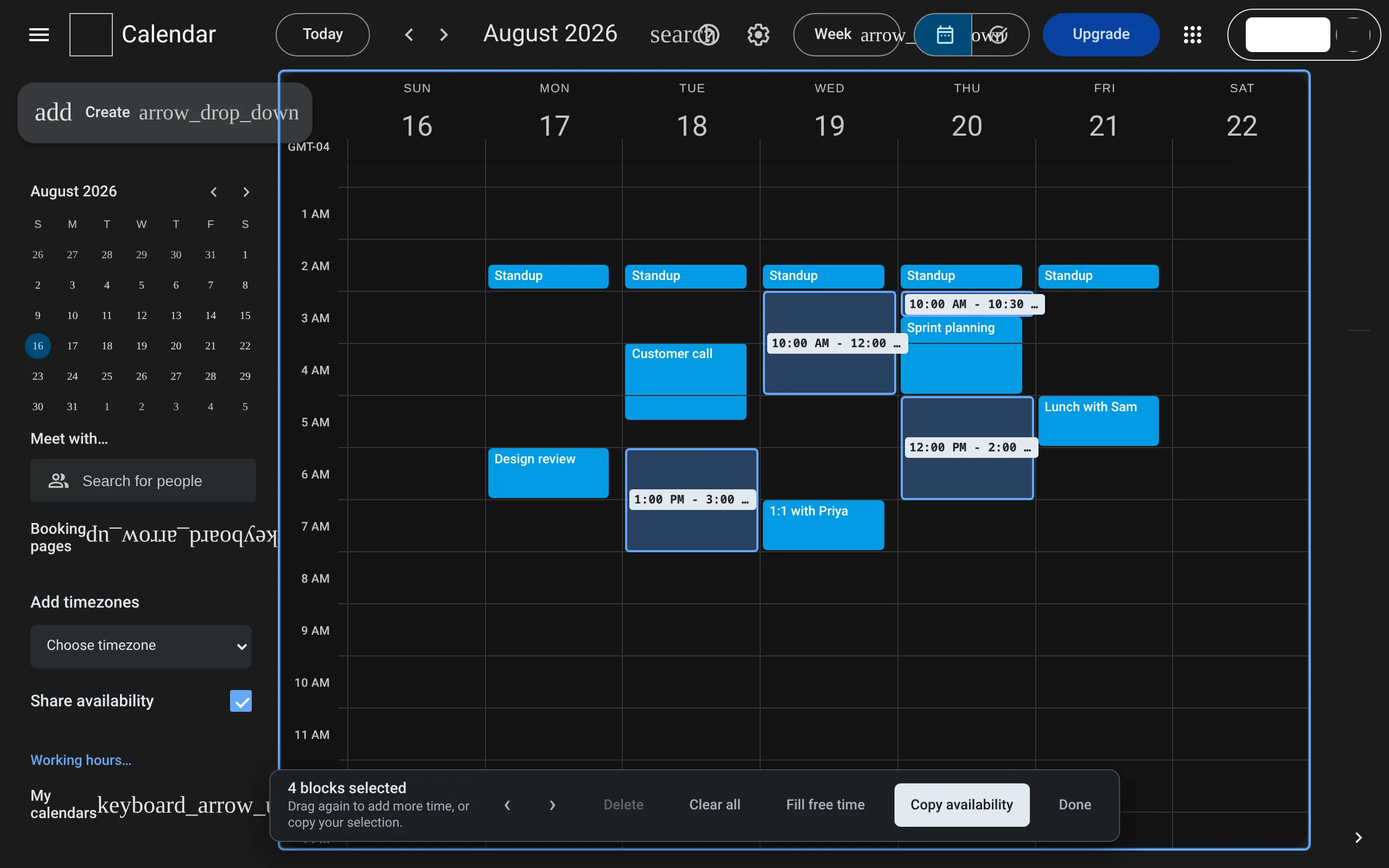
Times are grouped by day with the date in bold. Every range ends with its timezone, so nobody has to guess whether you meant their 2 PM or yours.
Gmail, Google Docs and other rich-text editors get a formatted list. Plain-text fields get the same list as text. Dates and times follow your Calendar settings: its language, its 12- or 24-hour clock and its timezone.
Tuesday, August 18
- 1:00 PM - 3:00 PM EDT
Wednesday, August 19
- 10:00 AM - 12:00 PM EDT
Thursday, August 20
- 10:00 AM - 10:30 AM EDT
- 12:00 PM - 2:00 PM EDT
In a plain-text field
### Tuesday, August 18
- 1:00 PM - 3:00 PM EDT

### Wednesday, August 19
- 10:00 AM - 12:00 PM EDT

### Thursday, August 20
- 10:00 AM - 10:30 AM EDT
- 12:00 PM - 2:00 PM EDT
Your meetings stay off the list
Slotclip sees where Calendar has drawn your events. A drag that crosses a meeting is split around it, and blocks can’t be moved or stretched on top of one. Everything snaps to 15-minute steps.
Fill free time selects every open slot in your working hours in one click. It skips weekends, time that has already passed and openings too short to be useful. Trim anything you’d rather not offer.
Their time, next to yours
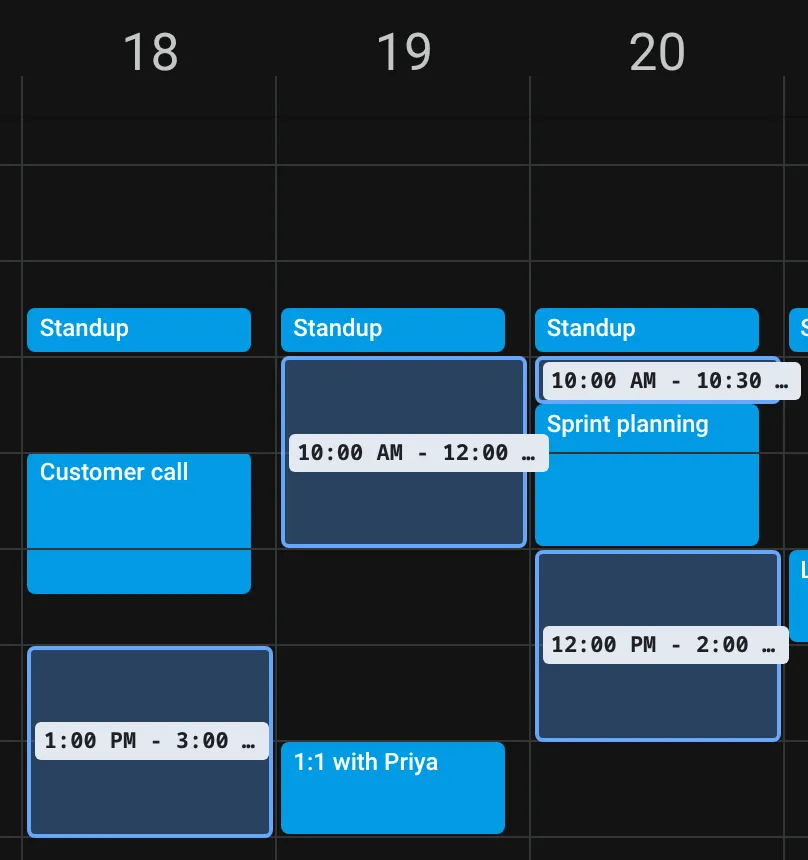
Pick a timezone under Add timezones in Calendar’s sidebar and a second ruler appears beside your hour labels. Copied times then include the other person’s local time, with their date when it falls on a different day.
- 1:00 PM - 3:00 PM EDT (6:00 PM - 8:00 PM United Kingdom Time)The choice clears when the page reloads, so an old timezone can’t slip into a later email.
What Slotclip can see
Slotclip runs entirely in your browser. Chrome shows one permission when you install it: “Read and change your data on calendar.google.com”. Here is what that covers.
- Where events sit on the Calendar grid
- Read, so your selections stay clear of busy time
- Event titles, guests, descriptions and locations
- Not read
- Your Google account and the Calendar API
- Not used. There’s nothing to sign in to
- Network
- No requests and no analytics. Copied times go to your clipboard only
- Your selections
- Kept in that Calendar tab until you clear them or close it
- Working hours and options
- Saved in Chrome’s sync storage with your profile
- Other websites
- None. Slotclip only runs on calendar.google.com
Get started
Add Slotclip to Chrome
Install it from the Chrome Web Store. There’s no account to create.
Open your week
In Google Calendar’s Week or Day view, turn on Share availability in the sidebar, click the Slotclip icon, or press Alt+Shift+A.
Drag, copy, paste
Drag over the times you’re free, choose Copy availability, and paste into your message.
Coming soon to the Chrome Web Store
Questions
Does it cost anything?
No. Slotclip is free.
Which calendars does it work with?
Google Calendar in Chrome, in Week or Day view. Month and Schedule views have no time grid to drag on. Outlook and Apple Calendar aren’t supported.
Does it check all of my calendars?
Every timed event visible on the page counts as busy. Calendars you’ve hidden or unchecked are left out, so you decide what counts.
Can I use it without a mouse?
Yes. Tab to a day, use the arrow keys to choose a 15-minute slot, and press Enter to add it. Arrow keys also move a selected block, and each change is announced to screen readers.
Does it work in other languages?
Copied dates and times follow Calendar’s language, so a German Calendar copies “Montag, 19. Oktober”. Slotclip’s own buttons are in English.
What happens if Google redesigns Calendar?
Slotclip reads Calendar’s page, which isn’t a public API. A major redesign could break it until an update ships.